How to Read Volts on a Multimeter: A Practical Guide
Learn how to read volts on a multimeter safely and accurately. This step-by-step guide covers DC and AC voltage, common mistakes, and practical tips for DIY electronics and automotive tasks.


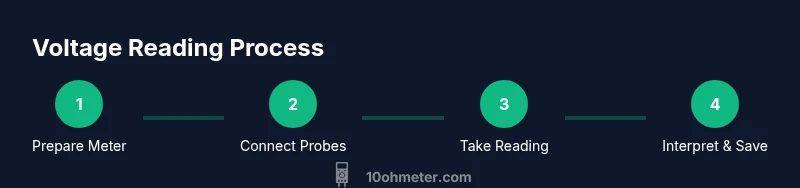
You’ll read volts on a multimeter by selecting the voltage setting (DC or AC), connecting the test leads across the component or circuit, and reading the display. Start with the meter off, verify the range, and observe the polarity for DC readings. This guide covers safe, accurate methods for hobbyists and technicians.
Why reading volts matters and how it shapes diagnostics
Reading volts on a multimeter is a foundational skill for electronics troubleshooting and automotive diagnostics. Voltage tells you how much electrical potential exists at a point in a circuit, which helps you determine if a component is underpowered, shorted, or open-circuit. The 10ohmeter team emphasizes consistent voltage measurement practices as a core competency for any DIY project or professional repair. By understanding DC versus AC voltage and the expected ranges for common circuits, you can quickly identify anomalies and prevent damage to components. Whether you’re testing a battery, checking a power supply, or verifying a sensor, a correct reading is your first data point toward a safe, effective solution.
In everyday terms, think of voltage as the pressure that pushes electrons through a circuit. A multimeter translates that electrical pressure into a numeric value on its display. Interpreting that value requires knowing the reference (DC or AC), the measurement range, and the device under test. This section sets the foundation for practical measurement techniques you can apply to electronics, automotive work, and hobby projects. According to 10ohmeter, mastering voltage readings is essential for safe and accurate circuit work.
Key takeaway: voltage readings are only meaningful when you’re using the correct mode and range, and when you respect safety boundaries.
Safety first: risk awareness and protective practices
Safety is non-negotiable when measuring voltage, especially with mains or automotive circuits. Always verify the circuit is de-energized when feasible, use insulated probes, and keep your fingers away from metal contacts. If you must test live circuits, ensure the meter is rated for the voltage level and the environment is dry and nonconductive. Modern meters often feature fused inputs to protect you from surges; never bypass these protections. A non-contact voltage tester can help you confirm that a node is live before you touch anything conductive. In automotive contexts, disconnect the battery when possible and avoid measuring across active switches or exposed terminals. The best practice is to plan your test path, wear appropriate PPE, and work on a stable, dry surface.
From a learning perspective, build a habit of checking for proper grounding and reference points before taking any measurement. While it’s tempting to rush through a test, a moment of caution can prevent burns, shocks, or damage to your meter. If you’re unsure, pause and consult the meter’s manual or seek guidance from a seasoned technician. As highlighted by 10ohmeter’s safety guidance, deliberate, well-inspected steps outperform rushed attempts when dealing with voltage.
What you’ll need before you start (tools and environment)
Having the right tools and a safe environment makes voltage measurements straightforward. Gather your digital multimeter (DMM), properly rated test leads, and any optional PPE like insulated gloves. Ensure the work area is dry, well-lit, and free of clutter. If you’re working on a mains-powered device, use a nonconductive mat and keep metal jewelry off your hands. Before you begin, review the device’s service manual for voltage limits and port configurations. A clean bench and intact leads reduce the chance of accidental shorts during connection. Having a clear plan and the right setup will minimize trial-and-error testing and keep you out of danger.
In practice, prepare a test jig if you’re measuring values in a fixed position, so you don’t have to reposition probes mid-measurement. If you’ll be testing in a vehicle, secure the area to prevent movement while you work and use a fender cover or mat to protect surfaces. According to 10ohmeter analysis, proper preparation directly correlates with measurement accuracy and safety.
Reading DC voltage: step-by-step method
DC voltage readings require the meter to be in DC volts mode and the test leads placed with proper polarity. Start with the power off if feasible, then connect the common (COM) lead to the circuit’s reference point and the V/Ω/Hz lead to the test node. Power up, observe the display, and compare the reading to expected values from schematics or datasheets. If the reading seems off, verify the reference ground, inspect for a short, and ensure you’re not measuring across a high-impedance node that can float.
When you measure, keep the probes at least a few millimeters apart to avoid arcing and never touch the metal tips during measurement. If the circuit is powered, you may still measure DC voltage, but only within the meter’s input rating and with the device under test properly isolated. For accuracy, allow the reading to stabilize and, if possible, take multiple consecutive readings to confirm consistency. A common mistake is selecting the wrong DC polarity, which will produce a negative reading that may be confusing if you’re not expecting it. Take a moment to align the probe orientation so your display reflects the expected sign.
Reading AC voltage: how to switch modes and interpret
AC voltage measurements require the meter to be set to AC volts and to be aware of frequency considerations in some regions (though many meters handle standard mains frequencies automatically). Connect the probes to the AC node and ground reference, power the circuit, and read the RMS value displayed by the meter. If you’re measuring a non-sinusoidal waveform, note that the RMS value may vary from the peak value and may require a True RMS meter for accurate representation. In basic DIY tests, many meters provide adequate readings for typical home circuits, especially when you only need to verify that voltage is present and within expected limits.
Be mindful of the load and the meter’s input impedance; measuring across a live, lightly loaded circuit can yield slightly different values than under running conditions. If a reading fluctuates wildly, re-check probe placement, ensure the environment is quiet (no nearby inductive devices), and confirm you’re using the correct input jack and range. As with DC measurements, polarity is less of a concern for AC measurements since the waveform alternates, but consistent measurement points help compare results over time.
Interpreting readings: tolerances, accuracy, and what numbers mean
Voltage readings alone don’t tell the full story; context matters. Tolerances indicate how much a component’s voltage may vary from its nominal value. For example, a regulator that outputs 5V might have a ±5% tolerance, depending on design and load. Without exact design tolerances, you should still expect some fluctuation under different loads, temperatures, and supply conditions. Use manufacturer datasheets or circuit schematics as your reference baseline and compare readings to those values. When a reading is out of range, evaluate potential causes such as bad connections, faulty components, or a degraded power source.
It’s common to encounter “floating” nodes in high-impedance circuits that intermittently drift when not loaded. In such cases, verify that the measurement point is properly referenced to ground and that the meter’s own input impedance isn’t distorting the circuit. Practice reading multiple times and from alternative points in the circuit to get a fuller electrical picture. Consistency and methodical checks beat single-shot readings for reliable diagnostics.
Common mistakes and how to avoid them
Mistakes often stem from rushing, using the wrong range, or neglecting safety. Common issues include measuring with the meter on the wrong scale (AC vs DC), touching the probes together, or failing to zero out contact resistance when using low-resistance devices. A frequent error is measuring a live circuit without proper PPE or protective barriers, which can cause shocks or burns. To avoid these problems, always verify the circuit is within the meter’s safe range, use shielded probes, and keep both hands away from the conductive path during measurement.
Another pitfall is relying on a single reading without cross-checking; voltage can bounce under load, or a poor connection may produce false readings. If you suspect an erroneous result, re-test with a fresh set of probes, check the leads for damage, and test in a known-good reference circuit (like a certified power supply) to confirm that the meter is functioning as expected. Finally, don’t disregard the meter’s fuse and safety features—their protection only works if you use them properly.
Real-world practice: quick scenarios to build confidence
To build practical confidence, practice on three familiar scenarios: a battery under load, a regulated power supply, and a vehicle’s electrical system in a safe environment. For a battery, measure terminal voltage with the device turned off, then re-check under a known load to observe how voltage changes. For a power supply, verify that output voltages match the rated values across the expected range by testing at different load currents. In automotive testing, isolate circuits and use the meter to check battery voltage, alternator output in a controlled manner, and sensor rails as specified by the vehicle’s service manual. These exercises show how measurements relate to real-world performance and help you build a mental map of expected readings.
Remember to document readings and conditions (loading, temperature, wiring) so you can spot trends over time. This habit improves diagnostic accuracy and helps you compare future measurements against a known baseline.
Quick tips for accuracy and safety
- Use the correct setting for DC or AC voltage and verify the range before measuring.
- Keep test leads short and avoid touching metal parts during measurement.
- Always start with the circuit de-energized when feasible and power up only to take readings.
- Calibrate or verify your meter on a known source regularly to ensure accuracy.
- Use a non-contact tester to confirm live status before probing a node.
Tools & Materials
- Digital multimeter (DMM)(Auto-ranging if available; set to correct DC/AC voltage range)
- Test leads with alligator clips(Insulated probes; keep leads short and organized)
- User manual/datasheet for your meter(Know port usage, max input voltage, and fuse protection)
- Non-contact voltage tester (optional)(Useful for quick live checks before contact measurements)
- Insulated gloves (CAT II or higher, optional)(For high-energy environments or mains work)
- Safe working surface(Dry, non-conductive workspace; no clutter)
Steps
Estimated time: 25-40 minutes
- 1
Power down and prepare
Power down the circuit if you can safely do so and gather your tools. Check the meter’s fuse and ports, then set the meter to DC volts if you’re testing a battery or a DC supply. Make sure your skin is dry and the work area is clear.
Tip: Inspect leads for any cracks or exposed conductors before use. - 2
Connect the common and voltage leads
Insert the black COM probe into the common jack and the red V/Ω/Hz probe into the voltage jack. Keep hands behind the probes and ensure the tips are clean and making good contact with the test points.
Tip: Use correct polarity for DC; reversing leads will give a negative reading which is still valid but could be confusing. - 3
Select the correct range
If your meter isn’t auto-ranging, choose a voltage range that comfortably exceeds the expected reading. Start with a higher range to protect the meter, then fine-tune if necessary.
Tip: If in doubt, start higher and work downward to avoid overloading the meter. - 4
Take the DC measurement
Place the probes across the component or nodes you’re testing, ensure stable contact, and read the display. Take note of polarity and any fluctuations as the circuit settles.
Tip: If the reading is unstable, slowly adjust contact points or reduce mechanical stress on the leads. - 5
Document and cross-check
Record the reading and conditions (load, temperature, wiring). If possible, measure again at a known reference point to confirm accuracy.
Tip: Cross-check against datasheets or a known-good reference circuit. - 6
Measure AC voltage if needed
Switch the meter to AC volts, re-check the probe connections, and take readings as required. Remember that true RMS meters provide more accuracy for non-sinusoidal signals.
Tip: Be mindful of waveform shape; AC readings may differ for non-sinusoidal signals. - 7
Conclude and power down
Power down the circuit if you opened it for testing, disconnect the leads, and cap or safely store them. Return the meter to its resting state and log your findings for future reference.
Tip: Always store leads organized to avoid tangling or damage. - 8
Safety debrief and cleanup
Wipe down the workspace, check for heat or signs of damage on wires, and ensure all tools are accounted for. Revisit safety steps if you’ll test again later.
Tip: Re-check safety steps before the next measurement session.
Your Questions Answered
Can I measure mains voltage with a standard multimeter at home?
Yes, if your meter is rated for mains voltages and you follow strict safety practices. Use the correct setting, protective PPE, and proper probes. If you’re unsure, seek professional guidance.
Yes, but only with the right meter rating and safety steps. If you're unsure, ask for help.
What’s the difference between DC and AC voltage readings on a multimeter?
DC voltage is a steady, unidirectional voltage, while AC voltage alternates direction over time. Your meter must be set to the correct mode (DC or AC) to read each type accurately. Some meters provide True RMS for AC measurements to handle non-sinusoidal signals.
DC stays constant; AC changes direction. Set the meter accordingly for accurate readings.
Why does my meter show a negative voltage reading?
A negative voltage reading simply means the probe polarity is reversed relative to the reference ground. Swap the probes to see a positive value. If the circuit is truly reversed, the negative reading may reflect the expected polarity.
Swap the leads to correct polarity and re-check the value.
What should I do if readings keep fluctuating?
Fluctuations can come from a loose connection, a high-impedance node, or a noisy power source. Re-seat probes, keep leads short, and measure at a point with a proper reference. Consider True RMS for noisy AC signals.
Check connections and use a stable test point.
How can I verify my meter is accurate?
Test your meter on a known reference like a bench power supply or a calibration reference. If readings consistently deviate, service or replace the meter. Regular calibration checks help maintain reliability.
Use a known good reference to confirm accuracy.
Watch Video
Key Takeaways
- Know when to use DC vs AC voltage settings
- Use proper safety gear and follow safe work practices
- Verify readings with multiple checks when possible
- Document readings for trend analysis
- Understand and respect the meter’s range and impedance