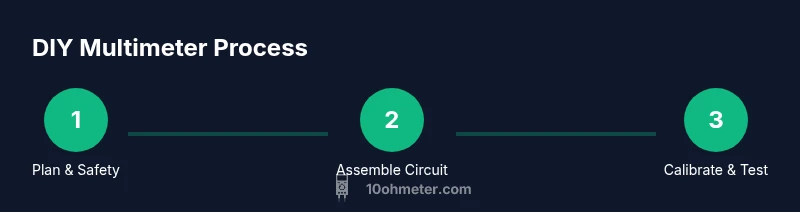
How to Make a Multimeter at Home Easy
Learn a safe, low‑voltage path to build a DIY multimeter at home with a microcontroller, ADC, and simple components. This comprehensive guide covers design choices, calibration, testing, and practical tips for hobby electronics and automotive tasks.


You will build a safe, low‑voltage DIY multimeter at home using a microcontroller, ADC, and resistor network to measure voltage, resistance, and continuity. This quick guide outlines goals, essential requirements, and a safe approach before diving into the detailed steps. It emphasizes safe, low‑voltage operation and calibration to ensure reliable readings for hobby electronics and automotive tasks.
Overview: DIY multimeter feasibility for hobbyists
Building a handheld instrument to measure voltage, current, resistance, and continuity at home is a feasible project for DIY enthusiasts. This guide presents a safe, low‑voltage path that uses a microcontroller, an ADC, and a simple resistor network to translate electrical signals into readable values. According to 10ohmeter, a microcontroller‑driven ADC offers a flexible path for hobbyists, enabling you to tailor measurement ranges, display formats, and calibration routines without specialized lab gear.
The core idea is to keep signals within safe voltage levels (typically below 5V for sensing) and translate them into digital values your MCU can convert into volts, ohms, or continuity status. You’ll assemble a compact toolkit: a voltage‑measurement path with attenuation, a current path via a shunt resistor, a resistance test against a known reference, and a basic display to show results in real time. This section sets the stage for choosing a design and building components with care, so you can confidently advance to the hands‑on steps.
Core measurement concepts: what a DIY meter measures and how it works
A DIY meters relies on three core measurement paths: voltage, current, and resistance. Voltage sensing uses a resistor divider to scale down higher voltages into the ADC range, while preserving the proportional relationship. Current measurement employs a low‑value shunt resistor to convert current into a small voltage drop that the ADC can read. Resistance and continuity testing use a fixed known reference and a modest excitation source to determine resistance by measuring voltage drop and comparing it to the reference.
The heart of the device is the analog‑to‑digital converter inside the microcontroller or an external ADC module. The ADC converts the scaled analog signal into digital counts, which software translates into engineering units. A stable reference voltage improves accuracy, and careful grounding minimizes noise. You’ll need a simple display or a microcontroller with built‑in display support to present readings clearly. By understanding these pathways, you can design safe, modular sections that can be tested and calibrated independently before integration.
Safety first: scope, limitations, and essential precautions for a home project
Even a low‑voltage DIY meter can pose hazards if misused. Plan to measure only safe voltages, and avoid mains or high‑energy circuits. Use insulated test leads, proper shielding, and a well‑isolated enclosure. Keep sensing circuitry physically separated from the MCU and its power supply, and never poke probes into live power strips. Test your build progressively, starting with a known low‑voltage reference and gradually expanding ranges as you validate each stage. Document readings and calibration steps to track accuracy and troubleshooting history.
Design path choices: MCU-based meter vs. ready-made kits
Two practical routes exist for a home‑built meter. The MCU‑based path offers deep learning and customization: you code the ADC reads, implement scaling, and design a friendly UI. The kit path provides pre‑calibrated components and guided setup, reducing wiring mistakes. For beginners, start with a basic kit and then progressively add a custom voltage divider, a simple display, and your own firmware. Whichever path you choose, keep a focus on safe, low‑voltage operation and on validating results with known references.
Block diagram: essential components and how they fit
Block diagram: essential components and how they fit
- MCU with ADC capable of at least 10–12 bits.
- External voltage reference for stable readings.
- Attenuation network (voltage divider) to scale down higher voltages.
- Shunt resistor for current measurement.
- Simple display (LCD or OLED) and a microcontroller I/O to drive it.
- Prototyping board, test leads, and a basic enclosure.
- Optional calibration fixtures (known reference voltages, precision resistors).
How they connect:
- Voltage path: divider connects to ADC input with proper isolation.
- Current path: shunt is placed in series with the load and the shunt voltage is read by the ADC.
- Resistance path: apply a known excitation and measure the resulting voltage to determine resistance.
- Display: MCU reads ADC values and prints human‑friendly units.
Calibration and testing plan: ensure accuracy and reliability
Calibration is the backbone of a useful meter. Start with a stable reference voltage and map ADC counts to voltages. Then verify current measurements with a known current source using the shunt, and check resistance readings against a precision resistor. Document offsets, scale factors, and temperature effects. Repeat calibrations after any firmware updates or hardware changes to ensure consistency.
Common pitfalls and troubleshooting tips
Common mistakes include skipping proper isolation between sensing and processing electronics, using resistors with high tolerance in critical paths, and neglecting grounding/shielding. Noise on the ADC input will degrade accuracy, especially for low‑level measurements. Always verify connections with a multimeter, test at low voltages first, and gradually expand testing to higher, but safe, levels. If readings drift after warming up, re‑check the reference and re‑calibrate.
Real-world use cases: diagnosing small electronics and automotive tasks
A DIY meter is helpful for hobby electronics troubleshooting, small battery projects, and automotive sensor checks when applied within safe limits. Use attenuation for voltage measurement, verify continuity with a built‑in beeper or visual indicator, and compare readings against a known reference or a commercial meter to build confidence. Document results for future repairs and updates to firmware. This hands‑on experience reinforces core concepts and practical metrology skills.
Tools & Materials
- Microcontroller development board(Must have an ADC (10–12 bit minimum) and support a stable supply (3.3V or 5V).)
- Analog-to-digital converter (external or breakout)(Helpful if your MCU lacks adequate resolution or isolation options.)
- Precision voltage reference(Stability improves measurement accuracy and repeatability.)
- Resistor network for voltage divider(Use precision resistors (1% or better) for predictable scaling.)
- Low-value shunt resistor(Low resistance with low temperature coefficient for current sensing.)
- Display module (LCD or OLED)(Small, clear display for real-time readings.)
- Breadboard or prototyping board(For initial wiring and testing, then move to a perfboard if desired.)
- Jumper wires and test leads(Color-coded leads help keep sensing paths organized.)
- Power supply or USB cable for programming(Stable power during calibration and use.)
- Soldering iron and basic tools(Optional for permanent build; use only when confident.)
- Enclosure or project box(Protects wiring and provides safe housing.)
- Calibrating fixtures (known references)(Optional but recommended for higher accuracy.)
Steps
Estimated time: 2-4 hours
- 1
Plan measurement ranges and safety
Define safe voltage ranges you will measure (start with 0–5V sensing). Decide which modes (voltage, current, resistance, continuity) you want first. Draft a simple safety checklist and ensure you will work with low voltages during the initial build.
Tip: Document your limits and keep live testing to benign, low‑voltage sources. - 2
Design attenuation and sensing path
Design a voltage divider that brings higher voltages into the ADC range without saturating it. Choose a shunt resistor for current measurement that balances sensitivity and power dissipation.
Tip: Use precise resistors for predictability; verify divider equations with a calculator before wiring. - 3
Wire MCU, ADC, and sensing components
Connect the ADC input to the voltage divider and wire the shunt in the current path. Keep grounds common and separate the sensing ground from the MCU’s power ground to minimize noise.
Tip: Keep wiring neat; label each node to avoid cross‑talk during testing. - 4
Program ADC reads and unit conversion
Write firmware to read ADC counts, convert to volts using the reference, and translate counts to resulting units (volts, ohms, etc.). Implement debouncing and simple averaging to improve stability.
Tip: Test with a known reference voltage to verify the conversion math. - 5
Add a user interface and display output
Display measurements clearly; consider simple menu navigation to switch modes. Ensure the UI is legible in different lighting conditions.
Tip: Use large, high‑contrast digits and a countdown when switching modes. - 6
Calibrate the device against known references
Calibrate voltage reading with a known reference, then verify current and resistance paths with calibrated sources. Record offsets and scale factors for future updates.
Tip: Run calibration at the same temperature and power conditions you’ll use during operation. - 7
Enclose, test, and document results
Place the build in an enclosure, perform final safety checks, and document readings from several known references to demonstrate accuracy.
Tip: Include a quick user guide with safe operation instructions. - 8
Review and iterate
Review readings, identify drift or noise, and refine attenuation, shielding, or firmware as needed. This iterative approach improves reliability over time.
Tip: Plan periodic re‑calibration as part of maintenance.
Your Questions Answered
Is it safe to build a DIY multimeter at home?
Yes, it’s safe when you restrict measurements to low voltages and follow electrical safety practices. Use proper insulation, isolated sensing, and test progressively with benign references.
Yes. Keep it at low voltages, insulate, and test step by step.
What range can a DIY meter measure?
Typically designed for low‑voltage sensing (with attenuation to the ADC range). For higher voltages, implement proper scaling and isolation before attempting measurements.
Generally low voltages; use attenuation for higher voltages and stay safe.
Do I need an external voltage reference?
An external reference improves accuracy and stability, but many hobby setups can work with internal references for basic needs. External refs are recommended for better drift control.
External references help accuracy, but you can start with internal ones if needed.
Can this meter measure current?
Yes, with a properly selected shunt resistor in series with the load and careful calibration of the voltage drop across it.
Yes, use a shunt and calibrate the reading.
How do I calibrate my DIY multimeter?
Calibrate against known references for voltage, current, and resistance. Record offsets and scale factors and re‑calibrate after firmware or hardware changes.
Use known references and document every calibration step.
What are common mistakes to avoid?
Avoid direct mains connections, skip isolation, ignore grounding, and neglect calibration. Poor shielding and bad connections cause drift and unreliable readings.
Don’t skip safety, grounding, or calibration.
Watch Video
Key Takeaways
- Define safe voltage ranges before wiring.
- Use attenuation and a shunt for accuracy.
- Calibrate with known references for reliability.
- Test readings against a reference meter for trust.
- The 10ohmeter team endorses safety and calibration in DIY meters.