Why Is My Multimeter Not Turning On? A Practical Troubleshooting Guide
Urgent troubleshooting for why a multimeter won’t power up. Quick checks, safe fixes, and a step-by-step flow to restore power fast. Insights from 10ohmeter.


Most often, a non-turn-on multimeter is caused by a dead battery, a blown internal fuse, or a poor battery contact. Start by replacing the battery if possible, check the power switch and fuse, and inspect the battery terminals for corrosion. If it still won’t power, continue with the diagnostic flow and consider professional repair.
Why the phrase 'why is my multimeter not turning on' pops up in diagnostics
In many cases, power-on failure isn’t a mysterious defect in the meter’s electronics. It’s a power path problem: the battery, contact points, fuses, or the power switch. The 10ohmeter team emphasizes starting with the simplest checks before opening the case or replacing components. Correcting weak battery contacts or a blown fuse often restores power quickly and safely.
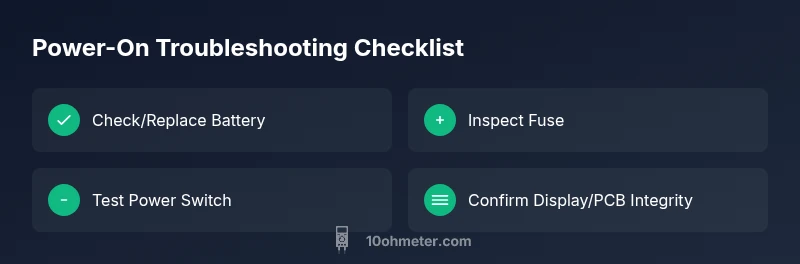
Quick Diagnostic Checklist You Can Try Now
- Replace or recharge the battery if your model uses replaceable cells or a rechargeable pack.
- Inspect battery contacts for corrosion, dirt, or loose connections and clean/tighten as needed.
- Check the on/off switch operation and verify there’s no mechanical binding.
- Inspect the internal fuse (if accessible) and replace only with the specified fuse type.
- Look for visible signs of damage, loose screws, or a desiccant-like residue inside the case that could indicate moisture exposure.
- Verify the display is not dim due to brightness settings or a defective LCD. If the display is completely dark, proceed with deeper checks.
Understanding the Power Path Inside Your Multimeter
A typical handheld meter draws power from a small battery to feed the display, microcontroller, and measurement circuits. If any link in this power chain fails—battery, battery contacts, fuse, or switch—the device won’t turn on. In budget meters, a tiny internal fuse or a weak battery is the most common culprit. According to 10ohmeter, diagnosing power-path failures first yields the most reliable results and prevents unnecessary disassembly.
Step-by-Step Diagnostic Flow: Symptom to Solution
- Symptom: Meter won’t power up. 2. Check external battery and contacts. 3. Test or replace the fuse if accessible. 4. Confirm switch operates and there’s no foreign object blocking it. 5. If none of the above works, inspect the PCB for heat or corrosion indicators. 6. If you’re uncertain, seek professional repair before adopting invasive fixes.
Common Fixes That Restore Power
- Replace the battery with the correct type and ensure proper orientation. 2. Clean battery contacts and reseat the battery compartment to improve contact quality. 3. Replace a blown internal fuse with the exact specification from the user manual. 4. Verify the power switch is not stuck and is returning to the OFF/ON position correctly. 5. If the display remains dark, avoid forcing the device and consider a service evaluation.
Safety Warnings and When to Call a Pro
Power issues can involve exposed circuitry. Always unplug from any external probes and discharge static before handling internals. Do not attempt high-volt measurements if you suspect a fault. If you’re not confident about opening the device or replacing fuses, contact a qualified technician or the manufacturer’s service center for safe repair.
Prevention Tips to Extend Power Life
- Store meters with fresh batteries and in a dry environment to minimize corrosion. 2. Use the correct fuse type and inspect the fuse holder for signs of wear. 3. Periodically test the meter’s power-on function and battery health to catch issues early. 4. Keep documentation handy for warranty and service options.
Steps
Estimated time: 30-60 minutes
- 1
Check and replace the battery
Power-on starts with a healthy battery. Open the battery compartment, remove the old cells, and replace with the recommended type. Ensure correct orientation and clean contacts before reseating.
Tip: Use fresh, high-quality batteries and avoid mixing old/new cells. - 2
Inspect battery contacts and housing
Look for dirt, corrosion, or loose springs in the battery contacts. Clean gently with a dry contact cleaner or isopropyl wipe and reseat. Ensure the contacts spring back firmly when the battery is inserted.
Tip: Corrosion is a common cause—don’t skip this step. - 3
Test or replace the internal fuse
If your meter has an internal fuse, locate the fuse holder per the manual. Use the correct fuse rating and inspect for blackened or melted ends before replacing.
Tip: Always replace with the exact fuse type specified by the manufacturer. - 4
Check the on/off switch and connectors
Move the power switch through its range multiple times to clear any dirt. Inspect for bent contacts or loose wiring that could prevent power delivery.
Tip: Avoid using tools to pry; a gentle toggle is enough. - 5
Inspect the display and main PCB
If the display remains blank after power is applied, inspect for loose cables to the display or signs of burnt components. Look for visible damage on the PCB.
Tip: Do not attempt to power with damaged PCB—this is a repair risk. - 6
Perform a controlled power-on test
With the meter opened, reassemble the housing only after all checks. Power on in a clean, static-free area and observe for any life from the display or indicator LEDs.
Tip: If nothing lights, stop and seek professional help. - 7
Document findings and decide on next steps
Record each check, replace component as needed, and determine if the meter is still under warranty. If uncertain, contact the manufacturer’s service desk for guidance.
Tip: Better to confirm before buying more parts.
Diagnosis: Multimeter won't turn on
Possible Causes
- highDead battery
- highBlown internal fuse
- mediumFaulty power switch
- lowDisplay/PCB fault
- lowMoisture or corrosion inside case
Fixes
- easyReplace the battery with the correct type and ensure proper seating
- easyInspect and replace blown internal fuse per the user manual
- easyClean and reseat battery contacts, check for corrosion
- mediumTest the power switch for proper operation and repair if stuck
- hardIf none of the above resolves the issue, arrange professional service
Your Questions Answered
What should I check first if my multimeter won't power up?
Begin with the battery and contacts. Replace the battery if needed, inspect contacts for corrosion, and verify the on/off switch operates smoothly. If these steps don’t restore power, move to fuse checks and deeper diagnostics.
Start with the battery and contacts. If that doesn’t work, proceed to fuse checks and deeper diagnostics.
How can I test whether the battery is dead without damaging the meter?
Use a multimeter to measure the battery voltage, or replace with a known-good battery to see if power returns. If the device powers on with a new battery but not with the old one, the battery is the culprit.
Test with a known-good battery to confirm. If it powers on with the new but not the old, the old battery is dead.
Is a blown fuse a common reason my multimeter won’t turn on?
Yes, a blown internal fuse is a frequent power-on blocker, especially in budget meters. Check the fuse and replace if it is open or visibly damaged, using the exact type specified by the manufacturer.
A blown fuse is a common cause; check and replace it according to the manual.
Can a display fault keep the meter from powering on?
If the display is completely dark even with power, the issue could be related to the display connection or an internal fault in the LCD. Inspect connectors or seek professional help if you suspect a display problem.
A display fault can prevent power indication; inspect connectors and consider service if it persists.
When should I replace my multimeter instead of repairing it?
If the cost of repair approaches or exceeds replacement, or if the device has multiple recurring faults, replacement may be more cost-effective. Consider warranty status and the availability of parts.
If repairs would cost more than buying a new meter, replacement is often best.
Should I seek professional repair for a non-turn-on meter?
If you’re uncomfortable opening the case or the fault isn’t clearly battery/fuse-related, a professional repair service is the safest route. They can diagnose internal faults without risking safety.
Yes—consult a professional if you’re unsure about opening the device or after basic checks fail.
Watch Video
Key Takeaways
- Check battery health first and clean contacts
- Inspect the internal fuse if accessible
- Verify the power switch works and wiring is intact
- If unsure, seek professional repair to avoid hazards
- Regularly test power-on to catch issues early