How to Test a Sensor with a Multimeter
Learn to safely test a sensor using a multimeter with practical steps, essential measurements, and troubleshooting tips. This guide from 10ohmeter covers voltage, resistance, and diode checks to verify sensor performance.


By the end of this guide you will be able to verify a sensor's functionality using a multimeter, identify healthy operating ranges, and spot common faults. You'll perform voltage, resistance, and diode tests applicable to many sensor types, while following safety practices and interpretation tips. This quick answer sets expectations for a practical, hands-on procedure.
How sensors interact with a multimeter
Sensors convert physical quantities into electrical signals. When you test a sensor with a multimeter, you verify supply voltage, the sensor output, and the integrity of the signal path. You can check resistance to gauge internal connections, run diode tests to confirm protective junctions, and inspect the signal path for unexpected breaks. By combining these measurements, you can identify many faults without specialized equipment. According to 10ohmeter, understanding the sensor-to-electronic interface helps you pick the right test mode and interpretation approach, which reduces guesswork and increases safety during diagnostics.
Safety first: prep and workspace
Before touching any wire, power off the circuit and discharge capacitors where applicable. Work on a non-conductive bench mat, and wear eye protection if you're probing live circuitry. Label sensor pins so you don’t confuse Vcc, GND, and signal lines. Keep leads short to minimize parasitic effects, and verify your meter is functioning on a known source (e.g., a battery) before testing the sensor. A tidy workspace minimizes accidental shorts and makes readings more repeatable across attempts.
Core measurements you can perform with a multimeter
You can perform several key measurements that apply to many sensors: DC voltage at the sensor input, DC voltage at the sensor output, resistance across input/output paths, and continuity checks to ensure wiring is intact. Diode tests help you confirm protective junctions or forward-biased elements in the signal path. Always start with power off, then switch to the appropriate mode and range. Document the expected reading range from the sensor datasheet so you can quickly spot deviations during testing.
Testing sensors: practical scenarios you’ll encounter
Thermistors, Hall-effect, optical, and pressure sensors each have typical testing approaches. For a thermistor, observe resistance vs. temperature changes; for a Hall sensor, monitor the output voltage as a magnetic field is applied; for a resistive pressure sensor, track how the output resistance shifts with applied pressure. In all cases, ensure you have a stable power supply and a known reference to compare against. If you don’t see a change in output when you expect one, inspect wiring, pin mapping, and possible sensor damage. 10ohmeter’s guidance emphasizes aligning your test setup with the sensor’s operating range and the circuit it drives.
Interpreting readings: what counts as “good”?
Good readings depend on the sensor type and its datasheet specifications. Start by confirming the supply voltage is within the recommended range, then verify the output signal responds to expected stimuli. If readings drift or stay flat, check for bad connections, damaged cables, or a faulty sensor element. When readings are within tolerance but the system behaves unexpectedly, consider external factors such as noise, grounding, or interference. 10ohmeter analysis shows that consistent test methods help isolate the root cause rather than misattributing issues to the sensor itself.
Step-by-step measurement workflow overview
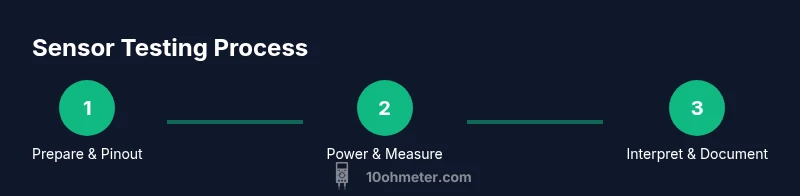
This block provides a high-level roadmap: prepare, power, measure, interpret, and document. You’ll identify pins, select the correct meter modes, apply a safe stimulus, capture readings, and compare against datasheet values. While the steps below outline the exact actions in order, always adapt to the specific sensor type and circuit you’re working with. Use diagrams or reference drawings to keep track of each connection during testing.
Common pitfalls and how to avoid them
Avoid using the wrong range on the multimeter, which can obscure small yet meaningful changes in readings. Loose connections or worn probes contribute to noisy results. Do not test current paths without a proper shunt or clamp meter, as attempting to measure current directly in a live circuit can damage both the meter and the sensor. Finally, never rely on a single reading—repeat measurements to confirm consistency and reduce error.
Documentation and next steps
Record every reading with time stamps, supply conditions, and ambient temperature. Attach a simple chart showing Vcc, output, resistance, and any applied stimulus. If discrepancies persist, consult the sensor datasheet carefully, re-check wiring, and consider recalibration or replacement. The goal is to build a reproducible test record that supports reliable diagnostics and future maintenance.
Tools & Materials
- Digital multimeter (DMM)(Auto-ranging preferred; capable of measuring DC voltage, resistance, and diode tests.)
- Test leads (red and black)(Insulated probes; use alligator clips if hands-free testing is needed.)
- Sensor datasheet or spec sheet(Helps determine expected voltage, resistance ranges, and output behavior.)
- Stable power supply or bench supply(Needed for active sensors that require a regulated Vcc during tests.)
- Replacement resistor and a small breadboard(Useful for creating simple test jigs and calibrations.)
- Alligator clips or clip-leads(Helps maintain secure test connections in tight spaces.)
- Safety PPE (gloves/eye protection)(Optional but recommended when working with automotive or high-current sensors.)
Steps
Estimated time: 15-30 minutes
- 1
Identify pins and power-down
Power off the circuit and locate Vcc, GND, and signal pins on the sensor. Use the datasheet to confirm pinout and avoid miswiring. Label each pin to prevent confusion during testing.
Tip: Label pins with tape or color markers before wiring. - 2
Set up the meter for DC voltage
Configure the multimeter to DC voltage mode and select an appropriate range. Have one probe on ground and the other on the sensor's output or Vcc as you test; start with the lowest reasonable range to avoid overloading the circuit.
Tip: If unsure, start with auto-range and verify with a known battery source first. - 3
Power the sensor and verify Vcc
Apply stable supply voltage to the sensor and measure the Vcc pin with the meter. Confirm it sits within the supplier's recommended range and matches the datasheet expectations.
Tip: Wait 10–30 seconds after power-on for the reading to stabilize. - 4
Measure sensor output under normal stimulus
Apply the sensor's intended stimulus (e.g., light, temperature change, magnetic field) and observe the output voltage or current. Compare this to the expected response curve in the datasheet or reference design.
Tip: Use a jig or fixture to keep the stimulus repeatable across tests. - 5
Check continuity and path integrity
With power off, test continuity between wires and through the sensor's signal path to detect open circuits or broken traces. If resistance readings are massively out of spec, re-check connections.
Tip: Keep leads short to minimize measurement error from parasitics. - 6
Diode and resistance sanity checks
Perform a diode test if available to verify protective junctions on input/output pins. Measure resistance across input/output paths to ensure internal components haven’t drifted open or short.
Tip: Compare to expected diode drop values from the datasheet. - 7
Document and compare to specs
Record readings, input conditions, and any stimulus applied. Compare results against the datasheet ranges to decide if the sensor is within tolerance or if replacement is warranted.
Tip: Create a quick chart to visualize each parameter for future testing.
Your Questions Answered
Can a multimeter test every sensor?
A multimeter can verify many fundamentals (voltage, resistance, diode behavior, continuity), but some sensors require specialized equipment or test fixtures to simulate the actual stimulus. When in doubt, consult the sensor's datasheet or a lab with the proper instrumentation.
A multimeter covers many basics, but some sensors need specialized tests or equipment.
What readings indicate a healthy sensor?
Healthy readings align with the datasheet under normal operating conditions. Look for correct supply voltage, an output that changes with stimulus, and expected resistance or diode behavior. Inconsistent results often point to wiring issues or sensor faults.
Readings should match the datasheet ranges and respond to stimulus.
Is it safe to test automotive sensors with a multimeter while the car is running?
Testing automotive sensors while the system is powered requires caution. Use proper PPE, isolate the test area, and avoid shorting circuits. If possible, test in a controlled bench setup before connecting to live automotive wiring.
Bench testing first reduces risk when working on cars.
Why doesn’t the sensor output change with stimulus in my test?
Check wiring and ground references, verify the stimulus is correct and actually affecting the sensor, and ensure you’re measuring the correct output node. A fault could be in the sensor, the circuit, or in the stimulus source.
Recheck wiring, stimulus, and the right output lead.
What should I do if readings are out of spec after testing?
Revisit the test setup, confirm power supply stability, and retest. If readings remain out of spec, consider component drift, wiring faults, or sensor failure, and plan replacement or deeper diagnostics.
Retest carefully, then evaluate drift or faults.
Do I need to recalibrate after testing?
Calibration needs depend on the sensor and system. If you’re diagnosing, recalibration is not always required; for production or high-precision applications, follow the manufacturer’s recalibration schedule.
Calibration depends on use; follow the sensor's spec.
Watch Video
Key Takeaways
- Verify sensor pins and safety before testing.
- Use correct meter modes for voltage, resistance, and diode checks.
- Compare readings to datasheet ranges for validation.
- Document results and repeat tests to confirm stability.
- Apply a measured stimulus to see expected sensor response.