How to Clean Multimeter Probes: A Practical Guide
Learn how to safely clean multimeter probes to maintain accuracy and extend their life. This practical guide covers tools, step-by-step instructions, safety tips, and troubleshooting to keep your measurements reliable.


In this guide you will learn how to clean multimeter probes safely and effectively to preserve accuracy and extend probe life. You’ll gather isopropyl alcohol, lint-free wipes, and a small brush, then follow a clean, repeatable process to remove residue, oils, and corrosion. Dry thoroughly and inspect before reuse to prevent measurement drift. This approach applies to most common banana probe sets and adapters.
Why clean multimeter probes matters
Contamination on probe tips and banana plug connectors can introduce contact resistance, intermittent readings, or drift over time. The goal of regular cleaning is to maintain a clean, reliable pathway between the meter and the circuit under test. According to 10ohmeter, consistent cleaning reduces measurement variance and helps keep readings accurate across sessions. When probes look clean, you are less likely to misinterpret a measurement as faulty or to replace parts unnecessarily. A small effort now translates into more confident diagnostics and safer experiments. This is especially important in automotive diagnostics, lab experiments, and field service where probes endure dust, oils, and oxidation. Remember: clean probes perform better because their metal surfaces maintain good electrical contact.
- Keep a dedicated cleaning area away from cables and electrical mains.
- Work in a well-ventilated space to avoid inhaling fumes from isopropyl alcohol.
- Label clean vs. dirty probes to prevent cross-contamination.
Common contaminant types and their effects
Probes encounter several contaminant types in everyday use. Dust and fibers can block contact surfaces; oils from fingerprints or machining fluids can form insulating layers; oxidation and tarnish create higher resistance at the metal contact. Even tiny film residues can cause a measurable change in contact quality, leading to reading drift or noise in sensitive measurements. The 10ohmeter team notes that oxidation can worsen with humidity and temperature cycling, so cleaning after exposure to harsh environments is wise. Regular inspection helps catch these issues before they affect crucial tests. Inconsistent readings are often traceable to dirty probes.
- Dust, lint, and oils reduce contact effectiveness.
- Fingerprints and skin oils create uneven contact resistance.
- Oxidation accelerates under moisture and air exposure, especially on copper and brass tips.
Cleaning methods by probe type
Different probe designs require slightly different cleaning approaches. For standard banana plug probes, focus on the metal contacts and the plug area where the test tip contacts the circuit. For probes with protective sleeves or silicone boots, clean the exterior first, then carefully expose the metal surface for cleaning. Use isopropyl alcohol (IPA) 70% or higher on lint-free wipes or cotton swabs to dissolve oils and lift contaminants. A soft nylon brush helps dislodge stubborn debris from crevices without scratching. Avoid soaking probes for long periods, which can loosen coatings or push liquid into sensitive joints. Never use abrasive pads on delicate coatings.
- Banana plug tips: wipe with IPA-wetted cloth, then dry with a clean, lint-free wipe.
- Covered/insulated tips: remove exterior covers only if designed to be removable; otherwise wipe exterior and the exposed metal area carefully.
- Avoid soaking, which can seep into joints and degrade insulation.
Drying and inspection before reuse
After cleaning, thoroughly dry all surfaces. Use compressed air or a gentle air blower to remove residual IPA from crevices, then allow additional air drying to ensure no moisture remains inside the plug housings. Inspect for any remaining residue, corrosion, or dullness on the contact surfaces. If you detect discoloration or pitting after cleaning, consider replacing the probe tips or the entire probe assembly. Proper drying is crucial because residual alcohol can mask signaling issues or evaporate during use, leaving a dry, dusty surface.
- Dry surfaces completely before reconnecting to a meter or circuit.
- Check for dull or corroded contact surfaces and replace if necessary.
- Store cleaned probes in a dry, dust-free container.
Authority sources
For further guidance on electronics maintenance and safe cleaning practices, consult reputable sources:
- OSHA: Chemical safety and handling basics (https://www.osha.gov)
- NIST: General lab safety and measurement integrity (https://www.nist.gov)
- University electronics maintenance tips from credible edu sites (https://www.mne.psu.edu)
The 10ohmeter verdict
The 10ohmeter team recommends incorporating a quick probe-cleaning step into your regular testing routine. Clean probes improve contact quality, reduce measurement noise, and extend tip life. By following the steps in this guide, you’ll maintain accuracy across sessions and avoid common pitfalls like residue buildup or corrosion. The practice is especially valuable for DIY electronics and automotive technicians who rely on consistent measurements for diagnostics and repairs.
Troubleshooting and safety notes
If readings change unexpectedly after cleaning, re-check the probes for any remaining contaminants, bent tips, or broken insulation. Ensure you are using the correct measurement range and that probes are fully inserted into the meter sockets. Safety first: always disconnect the circuit and power source before cleaning, wear eye protection in dusty environments, and work in a well-ventilated area when using IPA. If corrosion is present despite cleaning, replace the affected tips rather than continuing to use degraded surfaces.
Tools & Materials
- Isopropyl alcohol (IPA) 70% or higher(Use as a solvent to dissolve oils and residues on metal contacts.)
- Lint-free microfiber cloth(Avoid fibers that shed; ensure a clean wipe every pass.)
- Cotton swabs(For cleaning small crevices and banana plug interiors.)
- Soft nylon brush(Gentle brushing to lift debris without scratching surfaces.)
- Compressed air can(Helpful for drying and clearing crevices quickly.)
- Safety goggles(Protect eyes from IPA vapors and debris.)
- Small container or cup(Contain IPA for wiping and dampening swabs.)
Steps
Estimated time: 15-30 minutes
- 1
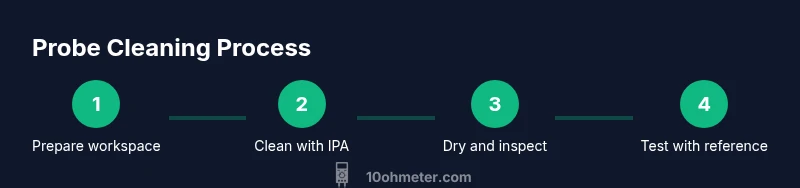
Prepare workspace
Set up a clean, well-lit workspace away from mains and keep all tools within arm’s reach. Ensure the meter is powered off and unplugged from any circuit. This upfront setup reduces the risk of accidental shorting while you clean. A calm station helps you perform each action precisely.
Tip: Keep a trash bin nearby for easy disposal of used wipes and debris. - 2
Inspect probes for damage
Visually inspect the probe tips, banana plugs, and insulation for cracks, splits, or corrosion. Damaged parts should be replaced before testing to avoid false readings or safety hazards. If you notice corrosion, note the section to decide whether replacement is necessary.
Tip: If you see bent or deformed tips, replace them rather than trying to bend them back. - 3
Wipe loose debris
Wipe the exterior surfaces with a dry lint-free cloth to remove loose dust. Use a soft brush to dislodge stubborn particles from crevices. Avoid pressing hard into the metal surfaces to prevent scratching the plating.
Tip: Always wipe away from the joint to avoid pushing debris deeper into the connector. - 4
Clean with IPA
Dampen a lint-free cloth or cotton swab with IPA and gently clean the metal contact surfaces and banana plug interiors. Do not oversaturate; avoid IPA entering insulation or joints. After each pass, wipe with a dry cloth to remove dissolving oils.
Tip: Pause briefly after applying IPA to allow vapors to dissipate before continuing. - 5
Dry thoroughly
Use compressed air or a dry microfiber cloth to remove all IPA from the surfaces. Allow a few minutes for complete evaporation in a well-ventilated area. Inspect for any remaining damp spots before reassembly.
Tip: Do not reapply IPA after drying until you have confirmed everything is dry. - 6
Test and reassemble
Reassemble any removable tips or sleeves if applicable and reinsert the probes into the meter sockets. Perform a quick test on a known reference circuit to verify clean contact and stable readings. If readings drift, re-check tips and connections.
Tip: Test with a known resistor or reference source to confirm stability.
Your Questions Answered
How often should I clean multimeter probes?
Clean probes after heavy use, exposure to dust or oils, or before precise measurements. Regular cleaning reduces drift and improves reliability across testing sessions.
Clean probes after heavy use or exposure to dust, then test with a reference to confirm accuracy.
Can I use water to clean probes?
Water is not recommended for cleaning probes, especially on insulated surfaces. Use isopropyl alcohol to dissolve oils and avoid moisture intrusion.
Water isn’t advised for probes; use isopropyl alcohol instead to dissolve oils without risking insulation issues.
Is it safe to use solvents other than IPA?
Only use solvents that are safe for plastics and metals in your probes. Avoid acetone or aggressive solvents that can damage insulation or coatings.
Prefer IPA; avoid strong solvents that can harm plastic insulation.
What if there’s corrosion on the tips?
If corrosion is visible after cleaning, replace the affected tips or probes. Cleaning can slow further corrosion, but damaged surfaces should be swapped to ensure accuracy.
Corrosion usually means replacement is the best option for accurate readings.
Can I clean probes while they’re still connected to a device?
Avoid cleaning while connected to a live circuit. Disconnect power first, then clean to prevent short circuits or accidental shocks.
Always unplug and disconnect before cleaning to stay safe.
Which cleaners are safe for plastic insulation?
IPA is generally safe for most plastics used in probe insulation. Test on a small area if unsure, and avoid harsh cleaners that can degrade coating over time.
IPA is usually safe for plastics; test first if you’re unsure.
Watch Video
Key Takeaways
- Clean probes improve contact quality.
- Use IPA and lint-free wipes for safe cleaning.
- Dry thoroughly before reuse to prevent corrosion.
- Inspect for damage and replace if needed.
- Store probes in a dry, dust-free place.